The Decision Pack
What the Decision Pack covers
Six detection types, sized and ranked by a senior Azure architect, then checked with your engineer on one 45-minute call.
The Decision Pack arrives 7 days after read-only access. It explains the bill by service, gives you 3 to 5 decisions ranked by benefit, effort and risk, and lists what to leave alone, and why. Every finding carries six decision fields.
How the Pack is built
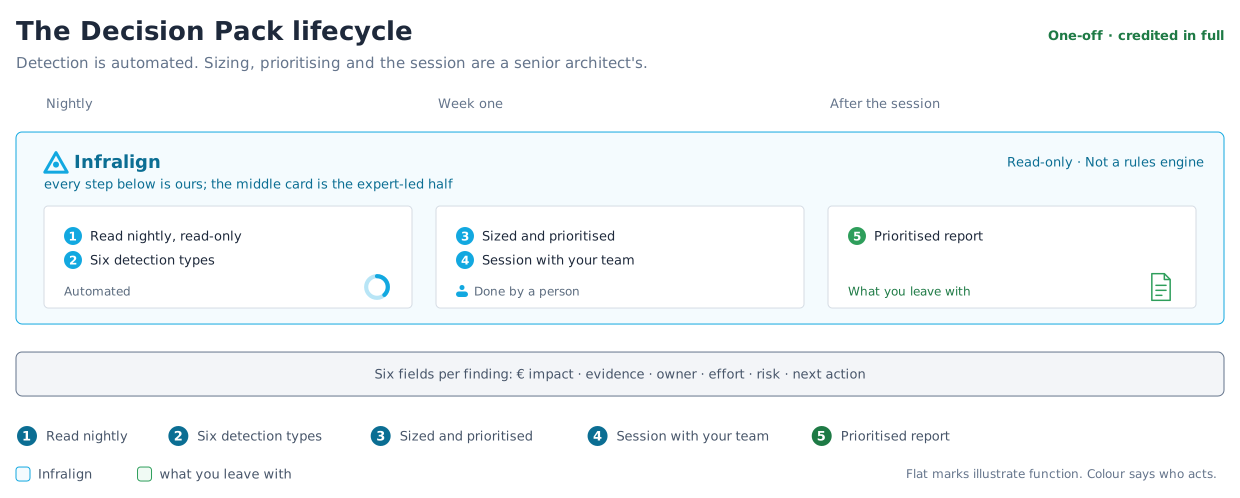
Section titled “How the Pack is built”| Step | Owner | Observable outcome |
|---|---|---|
| 1. Read the sources nightly | Infralign | The Data Ops dashboard shows current source dates. |
| 2. Detect six finding types | Infralign | Candidate findings carry evidence from your estate. |
| 3. Size and rank | Senior Azure architect | Each candidate has an impact estimate and a rank. |
| 4. The 45-minute call | Your engineer and the architect | Each finding has an owner and an agreed next action. |
| 5. Deliver the Pack | Infralign | Within the 7 days, engineering sees the findings 2 working days before finance. |
What the Pack surfaces
Section titled “What the Pack surfaces”Step 2 of figure 1 covers six detection types.
| Category | Signal | Threshold | € basis |
|---|---|---|---|
| Idle VMs | 30-day rolling p95 CPU, with an idle-day count | p95 CPU under 5% | The spend the idle VMs carry |
| Rightsizing | 30-day p95 CPU utilisation, with a confidence level per candidate | None | The saving on each shutdown or resize candidate |
| Reservations and Savings Plans | Commitment coverage per pool | 60% coverage target | Eligible spend not covered by a commitment |
| Orphaned disks | Managed disks with no attached VM, still billing | None | What those disks still charge |
| Log optimisation | Over-provisioned logging and retention that can be trimmed without losing signal | None | The logging spend the trim releases |
| Azure Hybrid Benefit (AHB) licensing | Eligible Windows and SQL workloads not yet claiming the benefit | None | The licensing saving the benefit delivers |
How the evidence is built
Section titled “How the evidence is built”A rightsizing finding based only on billing data is a guess. The Pack combines Advisor with three operational signals:
- 30-day p95 CPU from Azure Monitor
- idle-day counts
- inventory from Azure Resource Graph
An architect checks each candidate against actual spend, architecture, and policy. Advisor is an input, not the output.
That review is step 3 in figure 1.
What you need to provide
Section titled “What you need to provide”- Keep Azure connected through both required roles.
- Bring your engineer to the 45-minute call.
Done when each ranked decision has an owner and a next action.
Clean tags are not required: billing and resource metadata are enough, and extra context improves ownership attribution.
What the Pack leaves out
Section titled “What the Pack leaves out”The Pack is a cost review with architecture context. It does not include a penetration test, a general architecture review, or a compliance assessment.
The sample Decision Pack shows a finished one.
© Infralign Smart Solutions Limited · Registered in Ireland · Company no. 815072 · Dublin