

What you receive
Cost chatbot
A plain-language question becomes read-only SQL over your own warehouse, and the model reads the rows that come back.
The chatbot lives on the app’s Chat page and comes with the service. It answers plain-language questions about your own Azure spend, grounded in the same warehouse as the dashboards.
Responses stream back as they are generated, and each conversation keeps its session history, so a follow-up does not need the context repeated. It goes live with your dashboards, after the first nightly run.
Click any image to enlarge.
What you can ask
Section titled “What you can ask”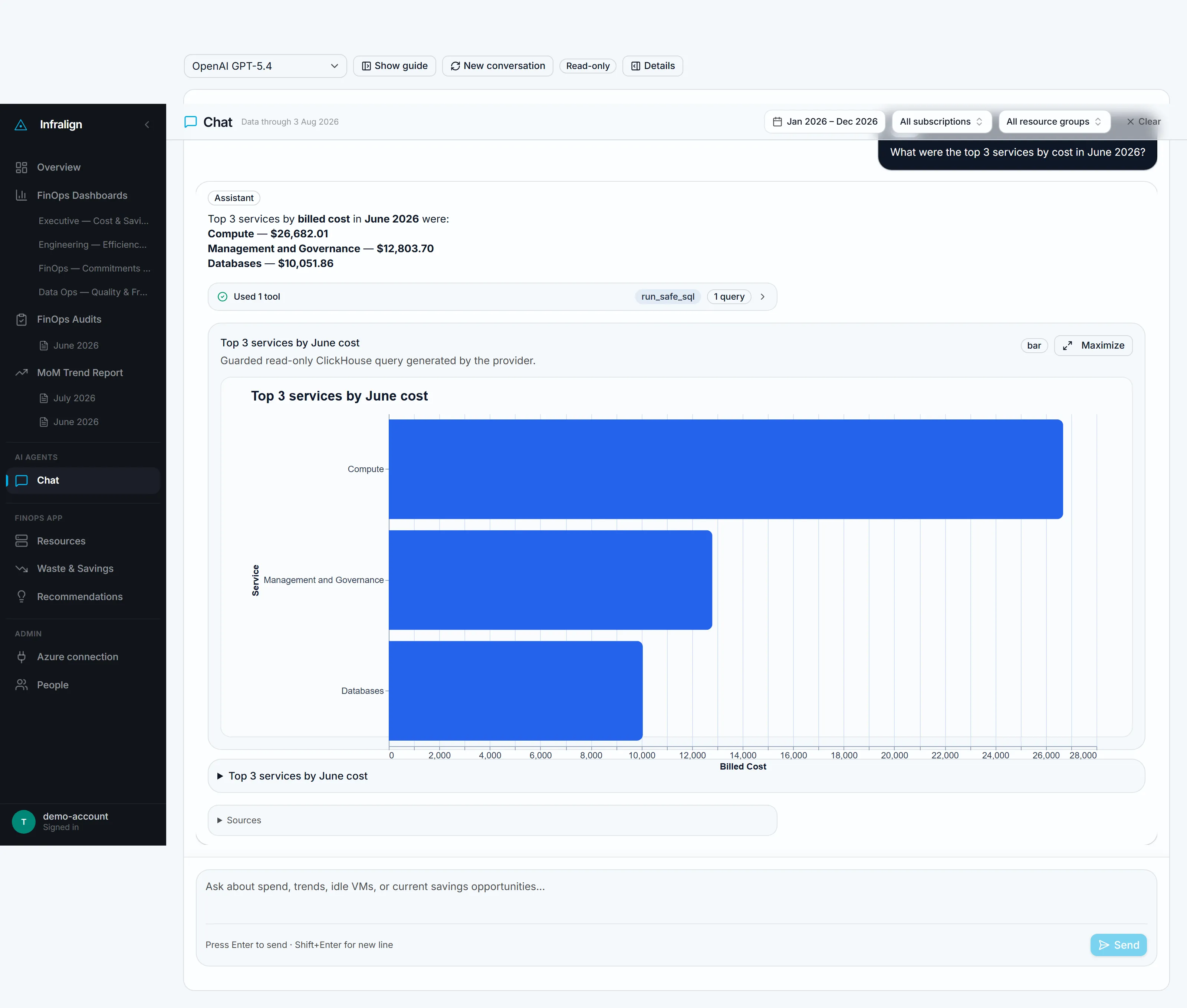
An answer from NovaPulse, an illustrative demo estate, captured 4 August 2026. The estate is billed in euros; the dollar sign on a chat answer is a known formatting defect and does not change the figure.
| Ask about | For example | Answered from |
|---|---|---|
| Spend | ”what did SQL cost last month?”, “which subscription grew fastest this quarter?”, “what’s our monthly spend on this resource group?“ | your billing data |
| Resources | ”which VMs are in North Europe?”, “what SKUs are our databases on?“ | anything the resource inventory can see |
| Movement | ”why did storage cost go up in May?“ | the resources responsible for the movement |
| Commitments | ”what’s our reservation coverage?“ | your Reservation and Savings Plan data |
Where answers come from
Section titled “Where answers come from”Questions are answered by running read-only SQL over your own tenant’s warehouse, the same gold tables the dashboards read. Azure OpenAI, in an EU region, writes that SQL. The model receives more than metadata.
Four things reach the model on a question:
- Your question, plus the scope it runs under, including the subscription IDs and resource-group names in scope.
- The shape of your warehouse: the allowlisted table names and the column names and types the query may touch. Not DDL.
- The SQL that ran, as text.
- The rows that SQL returned, capped at 50 per query. The model reads those rows and composes the answer from them.
Never sent: credentials of any kind, anything inside your resources, anything from another tenant. Turns are chained for the length of a session. Inference runs in the EU: see Security at Infralign.
Limits
Section titled “Limits”- It does not forecast or project beyond the data. It reports what has already landed.
- Results are capped at 50 rows per query, so a wider breakdown is better read from the BI view.
- It explains which resources moved and by how much (the billing “why”), not the business justification for a change.
Cross-check any number it gives you against the matching dashboard tile. Both read the same gold tables, so the two should agree.
How it stays safe
Section titled “How it stays safe”The chatbot’s access is deliberately narrow.
| Control | What it enforces |
|---|---|
| Single-SELECT SQL | One SELECT at a time. Every query is parsed and validated before it runs, and anything that is not a single read is rejected. |
| Table allowlist | Queries reach only an allowlist of your tenant’s own warehouse tables. No arbitrary schema access. |
| Row limits | Result sizes are capped, so a question cannot pull an unbounded export. |
| No cross-tenant access | Each tenant has its own warehouse. The chatbot cannot see, join to, or query another customer’s data. |
| Nothing inside your resources | The two roles cannot reach database contents, VM filesystems, or application data, and cannot change anything. Permissions explains the boundary. |
Getting better answers
Section titled “Getting better answers”- Be specific about time ranges: “last month” and “May” beat “recently”.
- Name scopes where you can: a subscription, resource group, or service sharpens the answer.
- Ask follow-ups. Each session holds context, so “break that down by resource” works after a spend question.
- If tags are poor, ask by resource group or naming pattern instead. Structural queries do not depend on tagging.
Where the chatbot fits
Section titled “Where the chatbot fits”Treat it as the fastest route from “that number looks odd” to an explanation. Movements you can’t explain through the chatbot are good candidates to raise on the 45-minute call, or in the Monthly Close. The same correlation work is what produces validated fixes.
© Infralign Smart Solutions Limited · Registered in Ireland · Company no. 815072 · Dublin