

Reference
Isolation and data handling
What the chatbot sends to the model, how tenants are kept apart, who can reach your data, and why Infralign holds no credential of yours.
Your data is pulled into a warehouse in Microsoft Azure in an EU region, isolated per tenant and encrypted in transit and at rest.
Security at Infralign carries the residency, encryption, subprocessor and certification claims, and this page does not restate them. Permissions lists every action the two roles cover. If your security team is weighing whether Reader’s control-plane scope is too broad, Why Reader, and what it cannot see holds the boundary between metadata and data-plane access.
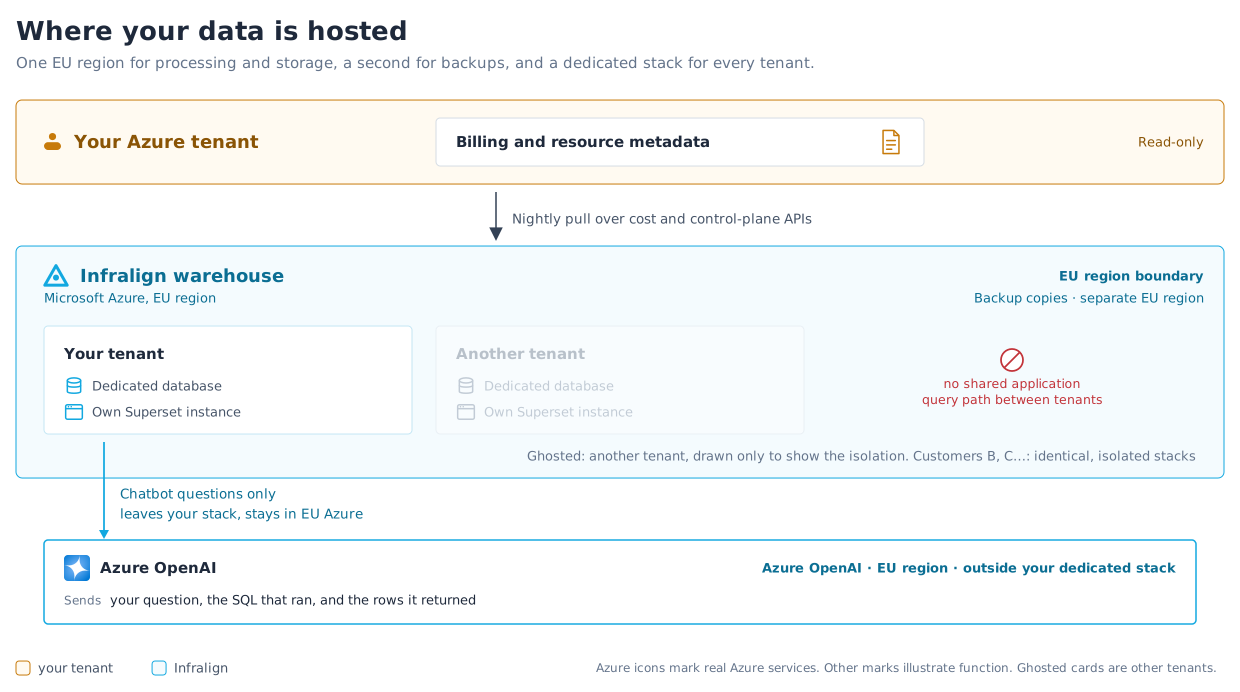
Figure 1 shows where your data sits and how tenants are kept apart.
What the chatbot sends to the model
Section titled “What the chatbot sends to the model”The chatbot’s language-model layer runs on Azure OpenAI in an EU region. Exactly what the model receives when you ask it a question:
| What is sent | Detail |
|---|---|
| Your question | The text as you typed it, plus the scope it runs under, which includes the subscription IDs and resource-group names in scope. |
| The shape of your warehouse | The allowlisted table names, and the column names and types the query may touch. Column metadata, not DDL, and not your whole schema. |
| The SQL that ran | The statement text, which carries those same scope identifiers. |
| The rows that SQL returned | Capped at 50 rows per query. The model reads those rows to compose the answer you see. |
What never reaches it: credentials of any kind, anything inside your resources (database contents, VM filesystems, application data), and anything belonging to another tenant.
Turns in a conversation are chained for the length of a session, so earlier questions and answers in the same session are retained for that session.
The chatbot is available to every account, and there is no setting that switches it off for one account. Suppressing it would need an Infralign change, agreed with you first.
Per-tenant isolation
Section titled “Per-tenant isolation”Each customer is isolated at the storage and query layer:
- Each tenant has dedicated warehouse databases. The application has no shared query path across customers.
- Each tenant has its own Apache Superset instance, scoped to that tenant alone.
- The chatbot runs read-only, single-SELECT queries against an allowlist of your own tenant’s tables. See the chatbot.
- Two components are shared, and neither holds customer data. One is the sign-in proxy, which every customer’s users authenticate through; it routes an authenticated session to the right tenant’s stack and stores nothing beyond what a sign-in needs. The other is the tooling Infralign deploys and operates the stacks with. The architecture diagram on Security at Infralign draws the sign-in proxy by name, so it is named here too.
Who can reach your data
Section titled “Who can reach your data”Application access is granted one named identity at a time: an allowlist of specific email addresses, each pinned to your tenant’s directory ID, never a whole email domain. Your own admins hold that list, and may add addresses only at domains recorded for your account. See manage who has access.
A removal takes effect in about a second, including any open session. Every add, removal and role change is audited, every authorisation decision is logged, and if the allowlist cannot be read, access fails closed.
Direct warehouse access may be needed for support or delivery work. Security at Infralign sets out the controls on it.
Credential custody
Section titled “Credential custody”Infralign holds no credential of yours.
- Infralign stores no secret, certificate or key belonging to your tenant. The nightly run authenticates as the Infralign enterprise application your admin consented to, using Infralign’s own credential, held on Infralign’s side and rotated by Infralign.
- What is stored is the connection record: your tenant ID, the subscriptions in scope, and the scope decisions made in the wizard. None of it can authenticate as you or as your tenant.
- No expiry exists for you to watch, and no secret for you to rotate. What controls the access is the two role assignments, which you remove yourself. See ending the connection.
Legacy: the classic setup’s client secret
The classic setup is not offered to new customers. Where an account still runs on it, the data access runs as an application you register and hold, and Infralign stores your client secret. These controls apply:
- Your admin enters the client secret in the setup wizard over TLS, and it is stored encrypted.
- The encryption key is held in a root-owned file on the host, outside the database, so a database copy alone decrypts nothing.
- No API returns the secret. The connection page shows the credential type, the expiry date and the last validation time, and nothing else.
- Rotate it at any time from the connection page. Create the new secret in Entra first. The new value is validated against Azure before it replaces the old one, and a failed check changes nothing.
- Certificate credentials and workload-identity federation are not enabled as a standard path. If either is required, agree and validate the authentication path before onboarding. See Entra app registration.
The Teams webhook is not a subprocessor
Section titled “The Teams webhook is not a subprocessor”The optional Microsoft Teams webhook delivers the monthly summary and cost alerts into your own Microsoft 365 tenant, in a channel you nominate. Nothing leaves your tenant to a third party. The two subprocessors that do exist are scheduled in the DPA key terms.
© Infralign Smart Solutions Limited · Registered in Ireland · Company no. 815072 · Dublin