

Evaluate Infralign
Who you need, and for how long
One person can do the whole connection in about 15 minutes. The Decision Pack then needs one 45-minute call with your engineer.
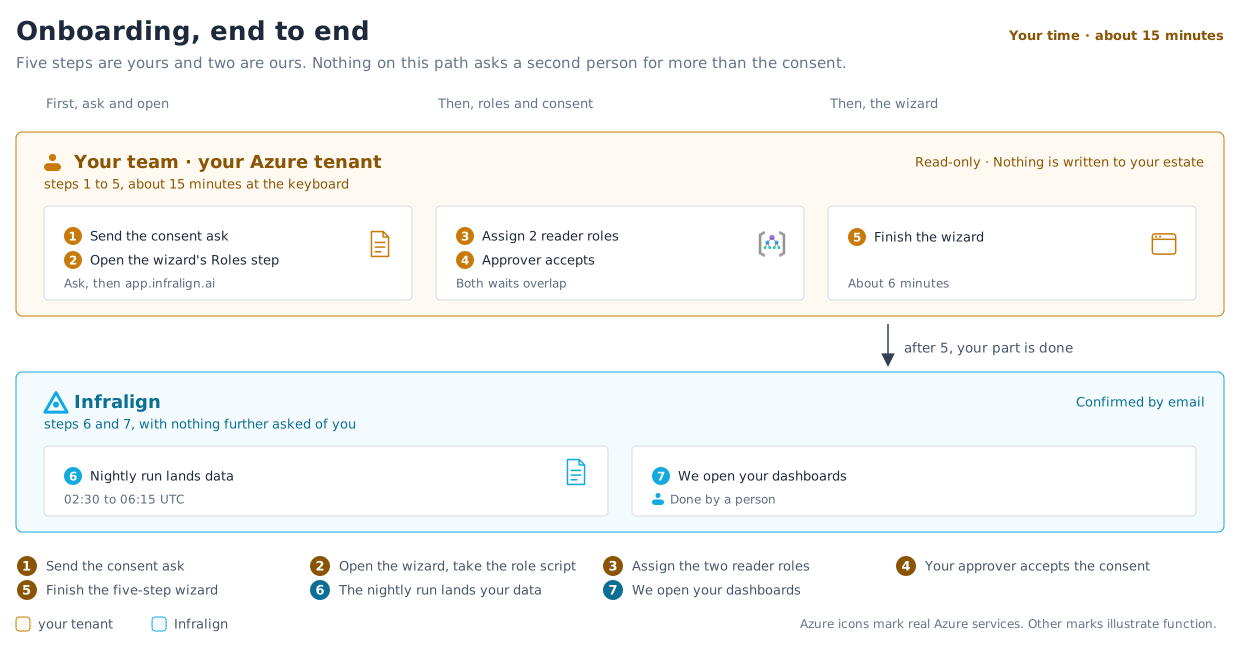
Connecting costs one person about 15 minutes at the keyboard, and about 30 minutes elapsed once the waits are counted. The Decision Pack then takes one 45-minute call with your engineer. Everything below is what that adds up to, in the order it happens; figure 1 is the same path on one picture. The onboarding checklist owns those two numbers and the prerequisites behind them.
Getting an Infralign account in the first place is a separate step and comes before all of it: see before you start.
Who has to be in the room
Section titled “Who has to be in the room”| Role | What they do | Time needed |
|---|---|---|
| Azure technical owner | Defines subscription scope, makes the two role assignments, completes the setup wizard, adds colleagues, explains workload constraints on the call, and owns production decisions. On a lean team this may be the only person needed. | About 15 minutes at the keyboard, about 30 minutes elapsed, plus the 45-minute call |
| Finance contact | Reconciles billed cost, explains discounts and commitments, and agrees how savings will be measured. | Reading the Pack, 2 working days after engineering |
| Identity or security approver | Reviews the data flow, approves the two Azure roles and any dashboard sign-in consent, and confirms the security position. | A few minutes for consent, plus their own review |
| Executive sponsor (optional) | Approves the ranked decisions and resolves ownership questions. | Reading the Pack |
One person may cover several roles.
Before you connect
Section titled “Before you connect”- Identify the Azure technical owner and the subscriptions to include.
- Book a call and order the Decision Pack so your first admin is enrolled, per before you start.
- Review price and terms and Security at Infralign.
- Review the two Azure role definitions in permissions.
- Assess whether names, tags, allocation labels, or Activity Log fields in scope hold personal, confidential, or regulated values.
- Note any retention, deletion, subprocessor, or data-processing terms your security team needs confirmed.
Connecting
Section titled “Connecting”Allow about 15 minutes at the keyboard and about 30 minutes elapsed at management group scope, more if you are assigning roles subscription by subscription. The admin’s step-by-step version of this list, with durations and links, is the onboarding checklist.
- Send the one-time admin consent request first. It is the only step that can wait in an approver’s queue for days.
- Grant Cost Management Reader and Reader to the Infralign enterprise application, at management group scope where you can, per subscription where you cannot. The wizard’s Roles step generates a Cloud Shell script that covers every subscription in one run.
- Complete the setup wizard at
app.infralign.ai: confirm the consent, pick up the role script if you still need it, watch the read-only checks, choose subscriptions, confirm. Nothing is pasted beyond your tenant ID. - Add the colleagues who need dashboards, and set each to Admin or Viewer.
- Test role revocation, and record who can trigger it.
You create no app registration, hold no client secret, and track no expiry. Finishing the wizard stores no credential of yours.
Where a change-control process needs the exact commands, use manual connection.
After the first nightly run
Section titled “After the first nightly run”- Watch for the mail from [email protected]. Your cost data lands on the first nightly run after you connect, and once that run has landed your dashboards open within one business day (see your first day).
- Reconcile the billed-cost baseline with finance.
- Note material events, shared-cost rules, and data gaps to raise on the 45-minute call.
Within the 7 days: the Decision Pack
Section titled “Within the 7 days: the Decision Pack”The 7 calendar days start once read-only access is in place.
- Your engineer joins one 45-minute call about your constraints, so each decision has a named owner.
- Engineering reads the findings first. Within the 7 days, engineering sees the findings 2 working days before finance.
- Finance and the sponsor read the Pack: 3 to 5 ranked decisions, and what to leave alone.
- Mark each decision as accept, reject, or investigate.
If you continue with the Monthly Close
Section titled “If you continue with the Monthly Close”- Confirm the fixed fee and scope, quoted in writing before you bought the Pack.
- Review dependencies, risk, validation, and rollback for each change. Where the written scope covers it, a change plan is prepared for you.
- Your team or your MSP makes each change through your own engineering process. Record the release dates.
- Review the measured result once enough Azure billing data has landed, typically in weeks three to four.
The Monthly Close starts only if you continue. See price and terms.
Next: connect Azure.
© Infralign Smart Solutions Limited · Registered in Ireland · Company no. 815072 · Dublin