

Reference
Ending the connection
The single source for revoking Infralign's access: which roles to remove, why the order matters, how fast it bites, and what deletion covers.
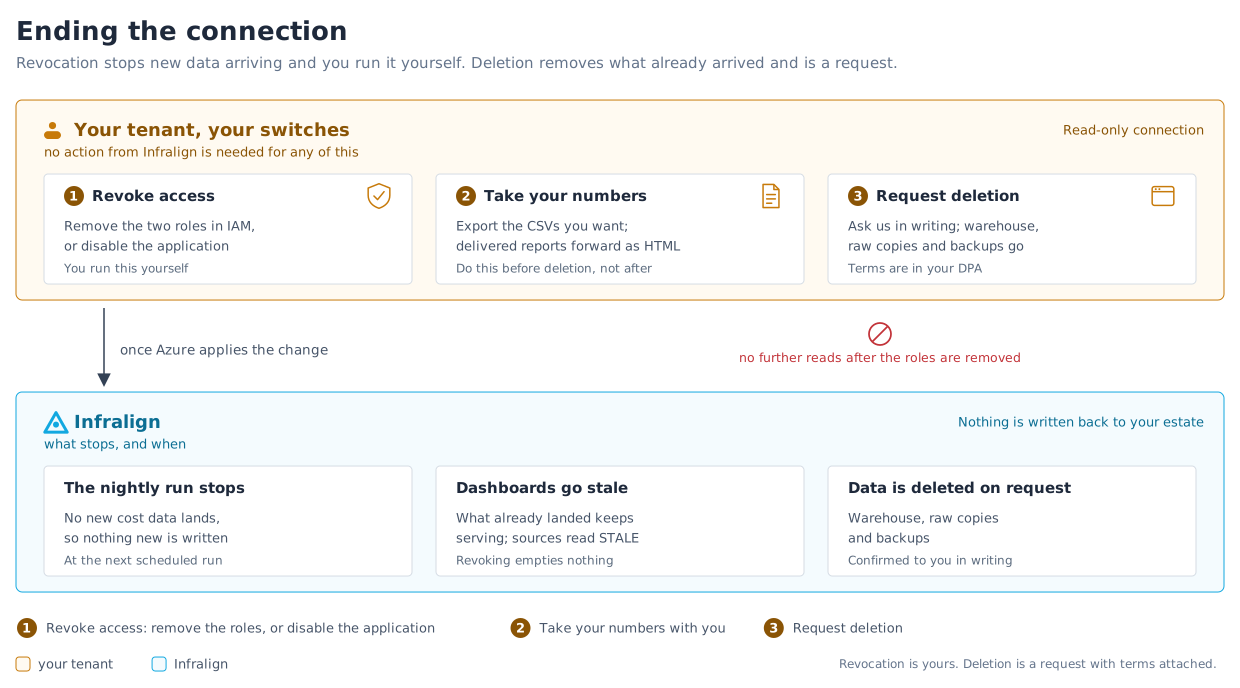
Two things end at different times, and conflating them is the mistake worth avoiding. Revocation stops new data arriving, and you run it yourself. Deletion removes what has already arrived, and it is a request with terms attached. Figure 1 puts the three sections below on one picture, with what stops on our side beneath them.
1. Revoke access
Section titled “1. Revoke access”This page is the single source for the revocation procedure. Other pages state one sentence and link here; if one of them disagrees with this section, this section is right.
Every switch below is yours to pull. You need no action from Infralign, because the connection is read-only.
Both sign-in and data access run as the one Infralign enterprise application in your tenant, so which switch you pull decides which of the two stops.
How many roles you are removing
Section titled “How many roles you are removing”Remove every role assignment held by the Infralign application at your chosen scope. Count them before you start, because the number is not always two:
| Your configuration | Roles to remove |
|---|---|
| The default connection | Two: Reader and Cost Management Reader |
| You enabled the optional FOCUS export lane | Three: the two above, plus Storage Blob Data Reader on the export storage account |
Following a two-role instruction on a FOCUS estate leaves a live data-plane grant on your storage account. Read the assignments back in Access control (IAM) → Role assignments, filtered to the Infralign application, rather than working from memory.
The order matters
Section titled “The order matters”Roles first, then the application. Remove every role assignment, confirm they are gone, and only then disable or delete the enterprise application. Delete the application first and the role assignments become orphaned entries bound to a principal that no longer resolves, which is harder to read back and harder to evidence to an auditor. Done in the order above, nothing is left behind.
| What you do | Effect |
|---|---|
| Remove every role assignment from the Infralign enterprise application | Data access stops: the application still authenticates, and every call returns AuthorizationFailed. Sign-in keeps working |
| Disable or delete the Infralign enterprise application | Both stop together: sign-in and data access end at once, because the role assignments bound to the application end with it |
How long it takes to bite
Section titled “How long it takes to bite”Azure re-checks role assignments on every request, so there is no waiting for a token to expire. What sets the bound is Azure’s own authorization cache:
- About 10 minutes at most. That is the refresh window on Azure’s authorization cache, and it is the number to put in a runbook.
- A still-valid access token does not survive it. Entra access tokens last about 90 minutes by default, but the token proves who the caller is, not what it may read. Once the assignment is gone and the cache has refreshed, the same token returns
AuthorizationFailed. - The deterministic backstop: disabling the enterprise application stops authentication immediately, with no cache to wait on. Use it when you need the clock to be zero rather than ten minutes.
Neither switch removes the data already collected. To have that deleted, ask Infralign, as in request deletion below.
On the legacy classic setup, data access runs as the infralign-reader application you registered and hold yourself, and it has four switches of its own:
| What you do | Effect |
|---|---|
Remove both role assignments from infralign-reader | The service principal authenticates, and every call returns AuthorizationFailed |
| Disable the service principal | Authentication itself stops |
| Delete the app registration | Both of the above, permanently |
| Rotate the client secret without giving Infralign the new value | The stored credential stops validating at its next use |
Deleting the Infralign enterprise application still ends sign-in on that path, but it leaves infralign-reader reading until you remove it yourself.
New collection stops within the bound above, or immediately if you disable the application instead. Removing a role assignment is the reversible option; deleting an application is not.
Test revocation before you rely on it, and record who in your organisation can trigger it. Removing the role assignments is the one to rehearse: it stops the data without locking your own people out of the dashboards.
2. Take your numbers with you
Section titled “2. Take your numbers with you”Do this before deletion, not after.
- Chart-level CSV export is available from the BI view on any dashboard.
- During an engagement, monthly report figures can be provided as a spreadsheet on request.
- Reports already delivered to the Audits page are HTML, and forward without editing.
A self-serve export API is on the roadmap and does not exist today.
3. Request deletion
Section titled “3. Request deletion”Write to [email protected].
Within 30 days of offboarding or of your request, backup copies included, confirmed to you in writing. That is the commitment written into the DPA key terms, which is the enforceable version. Deletion covers your tenant warehouse, the raw copies, and the backups.
The 30 days is an outer bound rather than a target: the warehouse and the raw copies go on offboarding, and the window exists because backup copies are deleted on their own rotation.
What happens to the dashboards and reports
Section titled “What happens to the dashboards and reports”Revoking access does not empty anything. The dashboards keep serving the data already in your warehouse, the freshness banner starts falling behind, and sources begin reading STALE as each one passes its expected window. Nothing new lands, so nothing new is written: no further monthly report, and the chatbot answers only from the history it already has.
All of it goes when the warehouse is deleted. Your account’s app access ends at the same point.
If you were mid-engagement
Section titled “If you were mid-engagement”Approved change plans already delivered to your team stay with your team, in your own repositories, under your own controls. Nothing needs unwinding on Infralign’s side, because every write to your estate was made by your own pipeline in the first place. See the safety model.
Savings verification stops when the billing data stops, so a change awaiting its observation window is left unclassified rather than marked verified.